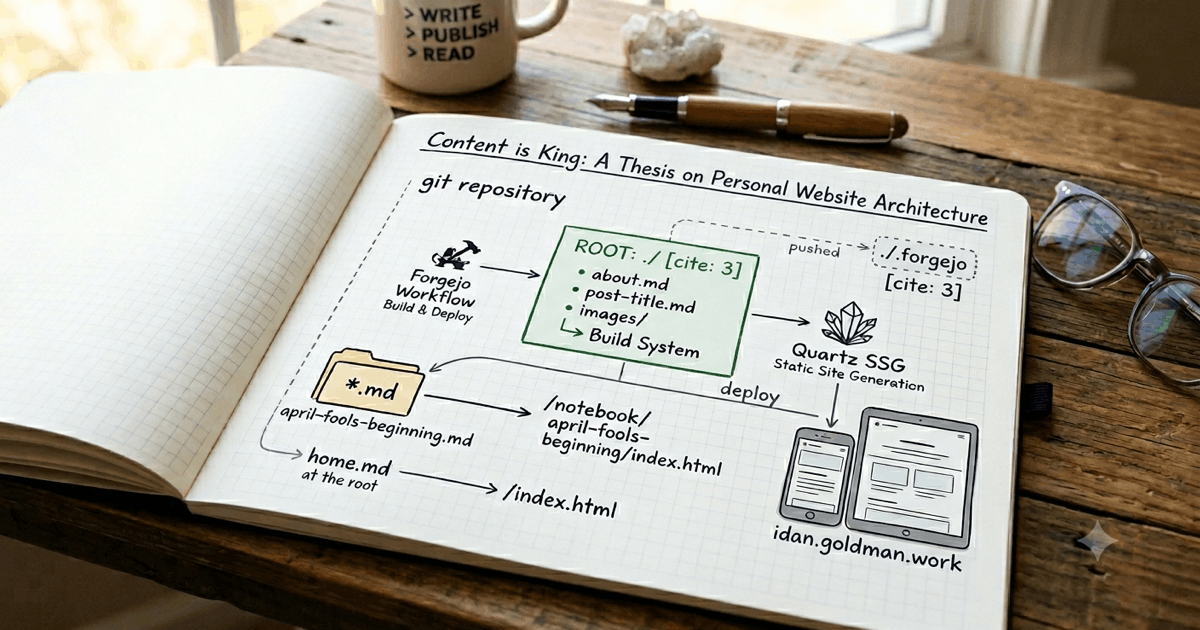
For years, I had developer’s block as a writer — trying to build/rebuild/optimize the website, putting my writings aside, chasing the perfect structure worthy enough to exhibit my thoughts, ideas, feelings, and work. All I wanted was a way to write and post the damn thing… yet all I did was code the damn thing, which got me blocked from writing the damn thing again and again. Now, I’m trying a new thing (for me): writing about how to build the damn thing while building the damn thing — dogfooding myself, if you will.
So… my current thesis is: content should be front and center, with everything else kept aside and to a minimum.
Focus on Content
Write > Publish > Read
Pretty simple, isn’t it? While it looks like any other generic content-publishing flow out there, my peace of mind lies in the details — keeping plumbing code out of sight, hidden in a dot folder, while content resides in the git repository’s root folder. Let me explain what I mean by that.
In any other SSG/CMS setup, the codebase is front and center and the content is just a folder or database entry that plays its part. I don’t like that, because it takes my focus from writing the content to maintaining the codebase, as any other ADHD developer would.
This time, content files are the main focus — as they always should have been — while the code setup files sit in a “hidden” folder at the top of the git repository. That way, when I open the main folder in any editor, the content is right there and not in a side folder a couple of clicks down.
How it looks
web/
├─ .forgejo/
├─ about.md
├─ home.md
└─ notebook/
  ├─ april-fools-beginning.md
  ├─ i-want-to-tell-you-a-story.md
  ├─ month-of-flying-by.md
  ├─ public-beta-is-out/
  │  ├─ content.md
  │  ├─ staticpage-logo.png
  │  └─ staticpage-landing-page.png
  ├─ ready-to-go-full-time.md
  ├─ ...
  └─ studio.md
Well, what do you think? To my eyes the codebase clutter is gone, and all I’m left with is structured content — files and folders translated into web paths, with some code plumbing underneath, like:
about.mdbecomes/about/index.htmlhome.mdbecomes/index.htmlcontent.mdfiles inside folders becomeindex.html- Any media files (like images) related to a piece of content live beside it, in a folder named after that piece of content.
How it works
The hidden piece of code plumbing (the magic) is done inside the .forgejo folder. Take a look:
web/
└─ .forgejo/
  ├─ workflows/
  │  ├─ build.yml
  │  └─ deploy.yml
  └─ quartz/
     ├─ custom.scss
     ├─ quartz.config.ts
     └─ quartz.layout.ts
So, what do we have here? workflows and quartz folders — one for building and deploying the website’s content you read here, and the other for the website’s configuration and customization you see here.
Why Forgejo and Quartz?
- Forgejo is easy: I already enjoy using it as my self-hosted git server and action runner. It runs blazing fast (in my setup) and has a snappy web UI, which helps.
- Quartz… don’t know yet, we will see. Seems like it’s made for generating websites out of folder-based content structures like Obsidian’s, and comes with supporting plugins to make life easier.
Workflows
The last part of this piece, before I jump into proving my thesis right, is how it all actually comes together — from writing a piece of content, through publishing it, to reading it on this website. The best way for me to explain is with a flowchart. So, here it is:
Yeah, I know it’s a bit much for a personal website, and might change later.
The End
…and that’s it, folks — thank you for reading! See you next time.
P.S. If you are reading this, the website is already up and this content piece is already outdated on how the actual website got built. Still the same idea — just different tools and workflows.